Sunday, April 22, 2012

What do you LOVE


Use Google app What do you Love to check for information and resources in a very visual way.
You get the results from a variety of Google sources, which is helpful for you to see what is out there in terms of videos, images, books, all different resources.

Have you ever tried What do you LOVE?


Some ideas for the classroom to encourage critical thinking:

Ask your students to look for information on a certain topic. let's say "World Population". 
First, this is a good chance to teach students a bit on how to better search on a certain topic. 
Then, ask them to analyze the results they got: 
  • What are the main trends?
  • What are people talking about in relation to this topic?
  • What do the images tell you about the topic?
  • Find one video that is really powerful
  • Which book would you read about this topic? Why?
  • State 5 interesting findings you had on the topic because of your search results. 
  • Is there something that was not shown in the search results that you find really relevant to the topic?
One follow up task would be for students to build a webpage with their main findings and thoughts.
They could use a wiki page, a blog post, Linoit, Popplet or any other authoring tool to explore the subject.

Any other ideas for What do you LOVE?

Saturday, April 21, 2012

Posts of the Week Worth Reading

Here are two of the posts of the week that are really worth reading and reflecting upon

Thursday, April 19, 2012

Guinness Superlatives

Though a common way to teach Superlatives, I felt like sharing this Power Point I prepared for my class to practice the superlatives in a fun and lively way. Feel free to use it.
Superlatives
View more presentations from Carla Arena.

After introducing the topic, I'll have this quick superlative quiz with students. First, they have to take a wild guess and compare answers. Then, they will use their cellphones to look for the answers. Finally, they can create their own quiz for the class.

Simple, but fun!

Tuesday, April 17, 2012

Explosive Present Perfect Collaboration in POPPLET

Present perfect or Past Perfect are not phrases that reflect the thrilling lesson planning moment I had in collaboration with Tweet mates and my Facebook network.

Collaboration is part of my perfect world of learning mixed with a bit of chaos and fun in which everyone involved has a lot to contribute to the whole, and the final outcome goes much beyond of what was initially envisioned. So, this is what really happened when I was preparing a class for my hybrid class (50% face to face, 50% online) last week. I wanted to do something different and exciting with my students, who are high school teachers. I've been trying to teach English, but also a bit of digital skills for them as I'm sure that their learners will profit from it.

So, as I just got back from the TESOL Conference with some new tricks and tools in my teaching treasure cloud (not box, for it is not self-contained!), I've realized it was time to test what I had heard about.
I went for the web tool and iPad app called POPPLET, presented in the APP fair in the Electronic Village by Suzan Stamper. I'll never be able to thank her enough, for this was the final result created collaboratively in a matter of minutes with my network collaborating from all over the world just because of a simple CALL:


More than words to show how simple, fun, collaborative and inspiring POPPLET is, here's the final PRESENT PERFECT wall we've created:


And here's the one my student has just started after our class:


My idea for them as a follow-up is that each one creates his own POPPLET with their learning highlights for the unit they are studying and invites peers to collaborate with them.

TESOL + POPPLET TOOL + NETWORK = EXPLOSIVE PRESENT PERFECT

Saturday, April 14, 2012

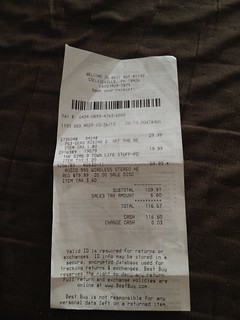
The Art of Critical Thinking with Store Receipts

Today, after being back from the TESOL Conference in Philly, I was organizing things, throwing out papers. Though I've been trying to be less and less attached to my old teacher voice that reminds me of keeping all the papers, recipes, booklets, brochures when I travel abroad, I simply can't resist it! When I get back home, I always have to clean up and get back to the new paradigm of going digital and avoiding clutter.

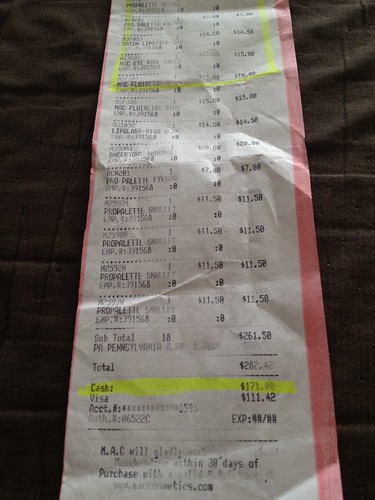
Well, I was about to throw away all the receipts I collected during my trip when I had this idea of using them for a critical thinking lesson plan mixed with digital storytelling. I took the photos of the receipts, having this idea in mind:

1. Distribute the receipts to different groups.
2. Give them some time to check the receipts.
3. Warm-up questions:
  • Where was the item bought? (Teacher can encourage sts to look for the city in google maps)
  • What did the person buy?
  • Was it a recent purchase?
  • How much did the person pay for the purchase?

3. Food for thought:

  • How do you imagine the person who bought the item is?
  • Why do you think the person bought the item?
  • Who do you think the person bought the item to? To himself/herself or to another person?
  • Do you think the person paid a fair price for it? Why or Why not?
  • Do you think that the person lived in the city where the item was bought or was the person just visiting town?
4. Students then exchange information with members from the other groups.
5. They get back to their groups and recreate the story behind that purchase, specifying who bought it, who was he/she buying the item to, where they were...The story should be told up to the moment the receipt is given to the client. 
6. To help them prepare their stories, show them sample introductions:

A.
"Mario was a witty, funny teen that loved video games. In fact, it was hard for him to decide for the right balance between study, play, family time, hanging out with friends...All he knew was that video games gave him that adrenaline rush of moving from one easier stage to that of a bigger challenge. So, that day he decided that it was time for..."
Receipt

B. "Pampering yourself. That's the key for a happier life. That day she decided to do something different..."
Receipt

C. "He has just arrived from a very tiring trip in which she couldn't close his eyes because of a crying baby. He longed for home already..."
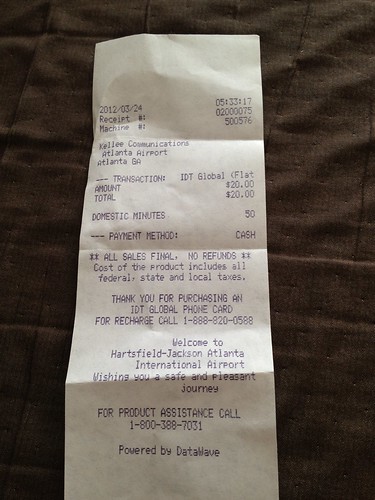
Receipt

D. "Her boyfriend moved to another country to study German. She was devastated. However, that day she decided to be happier and more connected to him. She went out to..."
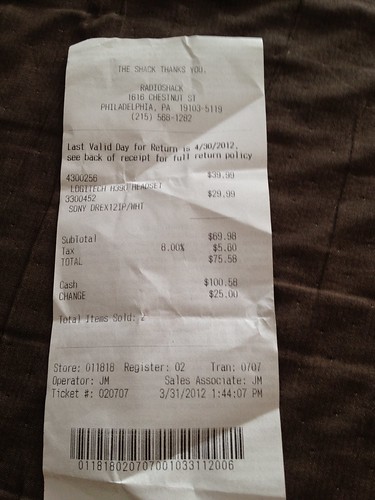
Receipt

For the stories, the students could draw and record it using the iPad app educreations or show me.
They can also use movie maker (Windows) or iMovie (Mac) to tell the story.
Another idea would be to record a video using images and voice and post it to youtube.

Going Beyond:
If the teacher has the chance to connect to other groups around the world, a neat cultural project would be to compare prices for the items in different countries, using a common currency. So, for example, how much would a PS3 game cost in different countries? Is it the same price? What is the price variation in terms of percentage? Is the item found anywhere in the world or is it harder to find in certain countries?

Any other suggestions to improve this lesson plan?

Tuesday, April 3, 2012

Making Waves and Culture Gone Digital

It is pure redundancy to say it, but the best part of joining a Conference like TESOL is really weaving and threading what you want to learn, your curious mind to the connections and networking that take place.

This TESOL was no different. Besides meeting my dear old Webheads community, I had the chance to revolve around the Electronic Village wonderful ideas and people excitedly presenting about their projects, ideas, developments and apps they've been trying out.


Also, it gave me immense pleasure to present twice in totally different topics that converged, though, into one idea: the idea of Culture.

In Cultural Expeditions Gone Digital, part of the Intersections colloquium,  I tried to explore with the audience some ways in which educators could enhance their culturally-smart classes through the wonders of cultural richness provided by exciting digital possibilities. Besides the cultural immersion through digital resources, I've shared some practical ideas for the classroom.


Here's the slideshow and all the references are available at http://brazilbridges.pbworks.com/w/page/51986293/Cultural%20Expeditions


In an another session, I've explored the idea of the new paradigms of the culture of Professional Development, not institutionally-bound anymore, but, in fact, self-directed and self-assembled through the possibilities provided by the digital world in a sustainable model of continuous evolvement of our own PD. All of that in big waves of micro-revolutions, those that we are the holders of our own professional destiny in a connected realm of people, networks, and nodes of learning. 


All the references are at http://brazilbridges.pbworks.com/w/page/52460489/Making%20Waves


Tesol12 Making Waves Through Online Circles of Learning
View more PowerPoint from Carla Arena

All in all, it was inspiring to be at TESOL to see what other professionals are up to. I just wish some would take more time learning about how to best present their messages...but this would be for another post!

Saturday, March 10, 2012

Your Mobile Site in a Few Clicks

As I was preparing one of my presentations to TESOL 2012 in Philadelphia, I dispersed a bit after much time of focused work to enjoy myself into serendipity, which took me to a very nice, simple site to create your mobile site.

In a few clicks, you can have your mobile site at http://getsharesquare.com/

Here's the final result of mine. Pretty interesting tool.
http://shsq.re/25ZP/


Tuesday, March 6, 2012

Ed Tech News Aggregator

There are many ways to keep yourself updated to impact your classroom using technology.
However, I've just come across this Ed Tech News aggregator worth checking, Spigot , produced by the Digital Media & Learning Research Hub . There are many interesting articles and research information to keep you on the loop of ed tech and to inspire you to keep moving forward.


Another way to keep yourself on top of the Ed Tech News is to check:

Sunday, March 4, 2012

The M in mLearning is for Motion

NASA Visualization Explorer (iPad app)Life has been so hectic and intense that I've had insomnia for the past month since I got back from vacation. It might seem that this is not a good sign, for we need to rest our tired minds after a long day of planning, training, discussing, changing...However, I feel that this period has been one of ignition, one that our minds keep processing all what we want to accomplish with the new possibilities. Parallel to all the elearning projects and changes we are phasing in at the school I work for, mLearning is in the air. I can see MOTION around even if it is still not consciously perceived by our teachers. Some have purchased tablets, others have been questioning how to deal with the cell phones disruptions in the classroom. Others have already come up with some simple and effective activities incorporating mobile device. The mLearning revolution has started and there's no way back. It didn't start top-down. In fact, it is the other way around. Our students are the provokers. They are the teasers. They are the ones starting to set the pace and motion in our classrooms. Some teachers feel that they are out of synch with the youngsters who are active producers of content out of the classroom.

NASA Visualization Explorer (iPad app)MOTION is undeniably taking shape in a way that it can't and shouldn't be ignored. So, this is the perfect timing for action on the trenches. I am getting prepared, and the Ed Tech Team that I work with is also shaking up. It is that period that ideas are popping up and we still need to understand what we should do with them. It is getting clear, though, that the first steps to start mlearning micro-revolutions to stir up our community of educators and learners can cause a little insomnia as a positive side effect. Here is what I've learned so far and have discussed with the Ed Tech Team:


  • Bring on the concept of BYOD (Bring Your Own Device); helping teachers realize that they can use what is already there is an essential step; give examples of lesson plans and activities and ask them to test in their classrooms.
  • Explore students' expertise; let them tell you what they are already doing with their gadgets. How authentic would that be in terms of language practice?
  • Help teachers develop their digital skills through a mind shift  in a way that they can deal comfortably with different devices operating systems, and this means their understanding that they might be the learners and the students their tech mentors. 
  • Start with very small projects that involve more than one group, that connect teachers together
  • Read, explore, subscribe, test in class. Part of the MOTION is learning, is becoming knowledgeable about an area that you still don't know much about. 
  • Use your network and give back to it by sharing your own results. 
  • Spot those teachers who have already started their own micro-revolution and help them stir up their own classrooms. Good models have an amazing, long-lasting ripple effect in the teachers' group.
  • Keep exploring with no set boundaries until you get the picture of what really works in your context. 
Here are some of the places I've been keeping all the inspiration and ideas to keep the MOTION rolling for the mlearning revolution:


Saturday, January 28, 2012

4 simple steps to join the mRevolution

For long, we've been talking in our circles of students as producers, not simply audience, and students finding their own voice. Educators know how important it is to move from our classrooms industrial production-like type of education. We've realized that there's much more potential in networking, in giving back to students the control of their own learning. We do know, however, that this is much easier said than done.

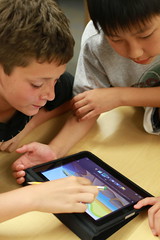
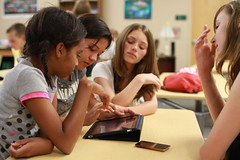
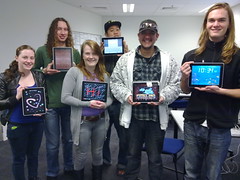
Music students with iPads
students in charge
This is a time of production, way beyond the passive-receptive mode of education. For some time now, we've had powerful tech tools around for the shift, but new devices, which are smaller, portable and in the hands of our learners are bound to give us the support we need for this active, exciting passionate movement towards meaningful learning. The world is more MOBILE than ever before. And we should grab this opportunity to make the move, to experiment, to learn with our students and to give a step forward.

So, here's what I've been doing that might give you some hints of what you could do to start an mRevolution:

  1. Give your students a chance to teach you new trick using those portable devices. They are experts! They know cool apps, they are into cool features that you don't even imagine they are there in cellphones, cameras, tablets, netbooks.
  2. Don't ask your students to turn off their devices. Ask yourself how you could use them to have exciting, dynamic lessons that tap into students' creativity and make students smile and enjoy themselves while learning. 
  3. I've been reading as crazy about mLearning, downloading apps to my tablet and cellphone, testing things out. The most important thing in this first step is to keep a record of all that, using a very visual curation tool, Scoop.it: http://www.scoop.it/t/elearning-mlearning and being closer, interacting with educators interested in the topic:
  4. I've been fearlessly trying mPossibilities in my classroom, which requires a lot of planning, but it is totally awesome when you see the positive results and the students' excitement. I had an adult group last year, and I tried different activities with them using the power of what they had in their pockets: cellphones. I had the idea that if they, who were not so aware or comfortable using those gadgets for learning, could profit from the experience, imagine the younger gang! The most important aspect of the trial part is reflecting upon it and keeping a record. So, blogging was an essential part of the process: http://collablogatorium.blogspot.com/search/label/mlearning
This is just the beginning of an exhilarating world of new possibilities in which our learners are truly in charge of producing something meaningful, of becoming active participants in their own learning process. 
What would you add to your mRevolution list?

In the meantime, here's a show I'd recommend following:
Listen to internet radio with Techchef4u on Blog Talk Radio